
Weekly Reflection #9 – Design Lab

I’m not sure where to start with reflecting on our tour of the School District #5 Design Lab today! We learned so much and saw so many cool gadgets (both high and low tech) and were really lucky to have a few hours with “The Real” Ryan McKenzie who has been doing his job in the Design Lab for almost 10 years. Our visit today was not just about a tour of the extraordinary space that he had created but also for preparation for our day at Gordon Terrace on Friday for the Innovation Hour stations that we are organizing for the whole school.
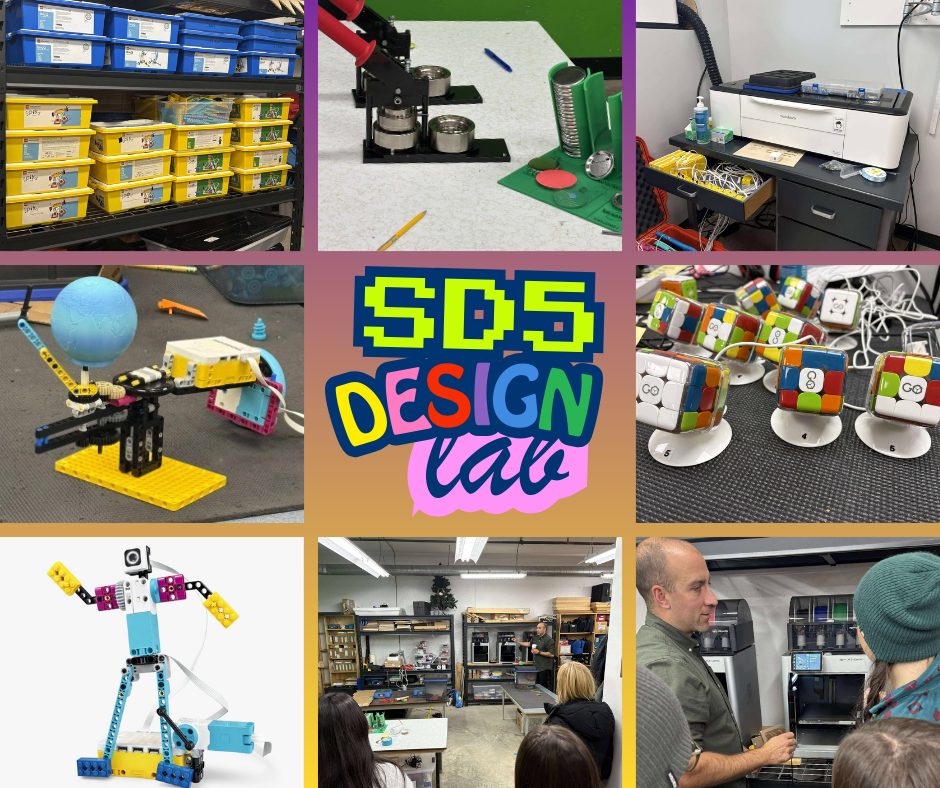
Here are some ideas, equipment and technology that stood out today. I’ll comment on their uses, some applicable resources and how teachers can keep them in mind when building year and unit plans.
Button Maker
The Tecre Button Maker machine is fascinating. It is such a simple tool and yet has so many uses! This week we are going to use the buttons as a memento for students so they can keep something to remind them of the stations they participated in during Innovation Hour. What a great idea!
Although this piece of equipment is simple, it still requires that students follow instructions to successfully make their button correctly. It offers artistic creativity and everyone can put a little piece of who they are on a button. In classrooms, teachers could use the button maker for nametags, special helpers, birthday kids, classroom jobs…. so many ideas! Due to the fact that it is easy to use, students of any age can be successful with it. This low-tech piece of equipment doesn’t have any privacy concerns, however, some encouragement around appropriate words and designs would be helpful for students to learn about the boundaries of their creations.
Cricut
I’ve been asked a few times lately, “Do you have a Cricut?” Sadly, the answer is no, however, they do have a black Friday sale on right now. I might just have to order myself an early birthday/Christmas present! Using the Cricut today to create cardstock graphics for the upcoming Innovation Hour made me realize how valuable this tool could be in a classroom, from organizing and labeling materials to supporting creative projects like cards, signs, or personalized items for students; however, despite its many benefits, there are also drawbacks, including the cost of the machine, the price of replacement blades and materials, and the learning curve required to operate both the hardware and the design software efficiently. In terms of age appropriateness, younger students could definitely engage in simple design tasks—especially with the user-friendly Cricut Design app—but more complex projects involving precise measurements or intricate designs would be better suited to older students who can navigate the software independently and use the machine safely under supervision. Although Cricut use itself does not typically raise substantial privacy concerns, some features of the Cricut ecosystem require creating online accounts or storing designs in the cloud, so teachers need to ensure that students’ personal information is protected and that any digital tools used align with BC privacy standards. Equity is also an important consideration, as the Cricut and its accessories can be expensive, meaning not all classrooms or schools will have access to this tool, which may widen creative and technological gaps between students; additionally, teachers must be mindful of ensuring culturally respectful design choices when students create graphics, labels, or personalized items. Here are some great ideas about using a Cricut in the classroom, along with a video below with some fun projects!
Update: I did splurge and make use of a good black Friday sale for my very own Cricut! Oh my!
3D Printers
I am sure that there are 100 different companies that sell 3D Printers. I hyperlinked the first one that came up with a search for “3D Printers Canada.” We learned at the Design Lab that 3D printers have dropped significantly in price. Ryan said that his first printer cost over $6000 and the current ones he has were only $1700. That’s fairly affordable. I think it’s really cool that students have access to this technology. We didn’t go into it too much but there is a design component to the process, a learning curve about the machine itself and how it works and of course patience while the design is created. It also seems like there is a lot to learn about the filament itself and where to source it along with whcih medium is best for which design. For example, Ryan made a flexible holder for the button making supplies and bendy watch bands for the micro-biotic gadgets that we are going to use on Friday. I have not dove into the world of 3D printing but I can imagine it would be super fun. I have seen some really cool creations at craft markets and one student in our program printed really cool apples as gifts. They opened up and had a hollow area inside to store little trinkets. So cool. 3D printing falls under ADST in the BC Curriculum and students can learn so many valuable skills while designing a 3D printing project. Here are the big ideas from the curriculum and you can easily see that designing projects with 3D printings could fall into all three of these ADST big ideas for Grade 4.

3D printing offers several educational benefits—it promotes creativity, hands-on learning, and engagement with STEM concepts—but it also comes with drawbacks such as the time required for printing, the need for technical troubleshooting, and the ongoing cost of consumable materials like filament. In terms of age appropriateness, younger students can take part in simple design activities, but the full process of using design software, managing printer settings, and safely operating equipment is better suited to upper upper elementary students and older, with significant scaffolding needed for younger learners. Although the act of printing itself does not pose major privacy concerns, some design programs require student accounts or cloud-based storage, so teachers must ensure that any software complies with BC privacy standards and limits the collection of personal information. Finally, equity and social justice issues must be considered, as not all schools can afford printers, materials, or maintenance; unequal access to this technology can widen the digital divide, and educators must also be thoughtful about the cultural and ethical implications of what students choose to design and replicate.
Visiting the Design Lab this week really highlighted how powerful hands-on, inquiry / creation-based learning can be for students in our district and how transformative these tools can be for us as future teachers. The space itself—filled with 3D printers, Cricuts, robotics tools, CNC, laser cutter, button makers, drones and other creative technologies, shows what’s possible when students are given opportunities to design, experiment, and build something meaningful. Access to a place like this supports a wide range of learning outcomes: it strengthens problem-solving, encourages creative thinking, deepens understanding of the design process, and helps students develop resilience as they iterate and troubleshoot. For teachers, the Design Lab opens the door to teaching in ways that go far beyond worksheets or traditional assignments; it allows us to integrate ADST meaningfully, make cross-curricular connections, and provide students with authentic, engaging learning experiences that feel relevant and empowering. It also gives us a chance to learn the tools ourselves, build confidence, and imagine how we might bring similar experiences, on any scale, back to our own classrooms.
Photo by Vladislav Bychkov on Unsplash